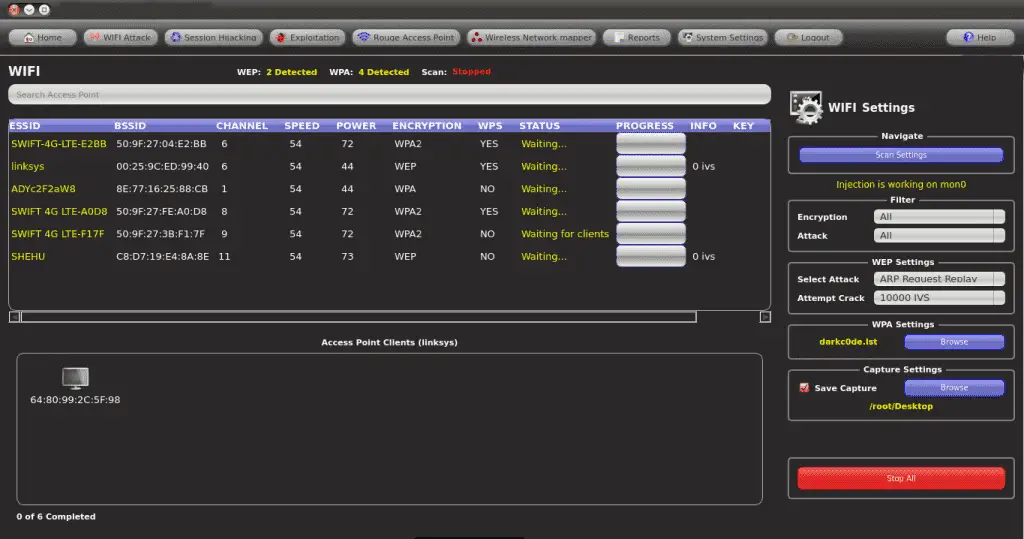
Fern Wifi Cracker Tutorial

After update, Fern WiFi Cracker stops whilst bruteforcing. Saw there were a lot of updates so I succumbed and now Fern just stops whilst in the bruteforcing phase. Re-run and it will stop, but not necessarily at the same point in the dictionary. Wifi WEP WPA Fern Pro Fern Wifi Audit Wifi Linux WPS DHCP DNS SERVER.

| '' |
| Fern-Wifi-Cracker 2.0 Not working with Ralink Chipsets (tested on AWUS036NH ) |
| What steps will reproduce the problem? |
| 1.start fern-wifi |
| 2.select interface |
| What is the expected output? What do you see instead? |
| expected output: 'Monitor mode enabled on wlan0mon' |
| instead: stuck in set_monitor_thread() |
| What version of the product are you using? On what operating system? |
| Linux Mint 64: |
| Linux xxxxxxxx 3.13.0-24-generic #47-Ubuntu SMP Fri May 2 23:30:00 UTC 2014 x86_64 x86_64 x86_64 GNU/Linux |
| Please provide any additional information below. |
| the reason: you only search for monitors with *mon pattern |
| realtek chipsets and recent airmon-ng version use a new pattern: wlandmon |
| here is a bugfix, i use for my version: |
| '' |
| defset_monitor_thread(self,monitor_card,mac_setting_exists,last_settings): |
| #print 'starting new thread' |
| status=str(commands.getoutput('airmon-ng start %s'%(monitor_card))) |
| #print 'nStatus of airmon-ng start', monitor_card, ':', status,'n' |
| if ('monitor mode enabled'instatus) or ('monitor mode vif enabled'instatus): #fix for ralink if |
| monitor_interface_process=str(commands.getoutput('airmon-ng')) |
| #print 'monitor_interface_process:', monitor_interface_process, 'n' |
| if ('monitor mode enabled'instatus): |
| regex=re.compile('mond',re.IGNORECASE) |
| elif ('monitor mode vif enabled'instatus): |
| regex=re.compile('wlandmon',re.IGNORECASE) #changed from mond to wlandmon |
| interfaces=regex.findall(monitor_interface_process) |
| print'available interfaces:', interfaces |
| if(interfaces): |
| self.monitor_interface=interfaces[0] |
| else: |
| self.monitor_interface=monitor_card |
| print'setting self.monitor_interface to', self.monitor_interface |
| variables.monitor_interface=self.monitor_interface |
| self.interface_combo.setEnabled(False) |
| variables.wps_functions.monitor_interface=self.monitor_interface |
| self.emit(QtCore.SIGNAL('monitor mode enabled')) |
| # Create Fake Mac Address and index for use |
| mon_down=commands.getstatusoutput('ifconfig %s down'%(self.monitor_interface)) |
| ifmac_setting_exists: |
| variables.exec_command('macchanger -m %s %s'%(last_settings,self.monitor_interface)) |
| else: |
| variables.exec_command('macchanger -A %s'%(self.monitor_interface)) |
| mon_up=commands.getstatusoutput('ifconfig %s up'%(self.monitor_interface)) |
| foriterateinos.listdir('/sys/class/net'): |
| ifstr(iterate) str(self.monitor_interface): |
| os.chmod('/sys/class/net/'+self.monitor_interface+'/address',0777) |
| variables.monitor_mac_address=reader('/sys/class/net/'+self.monitor_interface+'/address').strip() |
| variables.wps_functions.monitor_mac_address=variables.monitor_mac_address |
| else: |
| print'problem occured while setting up the monitor mode of selected', monitor_card |
commented Jan 4, 2015
now intergrated in Fern-Wifi-Cracker 2.1 ( https://code.google.com/p/fern-wifi-cracker/issues/detail?id=97 ) |
commented Jan 21, 2015
Hello, I use Kali Linux in VMware Fusion (Mac OS X). When i choose the wlan0 (AWUSO36NH) on fern-wifi, a problem appears ... I'm trying to attack and WPA access. So i think Fern-Wifi Cracker doesn't work well with AWUS036NH. Sorry for my poor english. |
Using Fern Wifi Cracker
| '' |
| Fern-Wifi-Cracker 2.0 Not working with Ralink Chipsets (tested on AWUS036NH ) |
| What steps will reproduce the problem? |
| 1.start fern-wifi |
| 2.select interface |
| What is the expected output? What do you see instead? |
| expected output: 'Monitor mode enabled on wlan0mon' |
| instead: stuck in set_monitor_thread() |
| What version of the product are you using? On what operating system? |
| Linux Mint 64: |
| Linux xxxxxxxx 3.13.0-24-generic #47-Ubuntu SMP Fri May 2 23:30:00 UTC 2014 x86_64 x86_64 x86_64 GNU/Linux |
| Please provide any additional information below. |
| the reason: you only search for monitors with *mon pattern |
| realtek chipsets and recent airmon-ng version use a new pattern: wlandmon |
| here is a bugfix, i use for my version: |
| '' |
| defset_monitor_thread(self,monitor_card,mac_setting_exists,last_settings): |
| #print 'starting new thread' |
| status=str(commands.getoutput('airmon-ng start %s'%(monitor_card))) |
| #print 'nStatus of airmon-ng start', monitor_card, ':', status,'n' |
| if ('monitor mode enabled'instatus) or ('monitor mode vif enabled'instatus): #fix for ralink if |
| monitor_interface_process=str(commands.getoutput('airmon-ng')) |
| #print 'monitor_interface_process:', monitor_interface_process, 'n' |
| if ('monitor mode enabled'instatus): |
| regex=re.compile('mond',re.IGNORECASE) |
| elif ('monitor mode vif enabled'instatus): |
| regex=re.compile('wlandmon',re.IGNORECASE) #changed from mond to wlandmon |
| interfaces=regex.findall(monitor_interface_process) |
| print'available interfaces:', interfaces |
| if(interfaces): |
| self.monitor_interface=interfaces[0] |
| else: |
| self.monitor_interface=monitor_card |
| print'setting self.monitor_interface to', self.monitor_interface |
| variables.monitor_interface=self.monitor_interface |
| self.interface_combo.setEnabled(False) |
| variables.wps_functions.monitor_interface=self.monitor_interface |
| self.emit(QtCore.SIGNAL('monitor mode enabled')) |
| # Create Fake Mac Address and index for use |
| mon_down=commands.getstatusoutput('ifconfig %s down'%(self.monitor_interface)) |
| ifmac_setting_exists: |
| variables.exec_command('macchanger -m %s %s'%(last_settings,self.monitor_interface)) |
| else: |
| variables.exec_command('macchanger -A %s'%(self.monitor_interface)) |
| mon_up=commands.getstatusoutput('ifconfig %s up'%(self.monitor_interface)) |
| foriterateinos.listdir('/sys/class/net'): |
| ifstr(iterate) str(self.monitor_interface): |
| os.chmod('/sys/class/net/'+self.monitor_interface+'/address',0777) |
| variables.monitor_mac_address=reader('/sys/class/net/'+self.monitor_interface+'/address').strip() |
| variables.wps_functions.monitor_mac_address=variables.monitor_mac_address |
| else: |
| print'problem occured while setting up the monitor mode of selected', monitor_card |
commented Jan 4, 2015
Fern Wifi Cracker Mac Os X
now intergrated in Fern-Wifi-Cracker 2.1 ( https://code.google.com/p/fern-wifi-cracker/issues/detail?id=97 ) |

commented Jan 21, 2015

Hello, I use Kali Linux in VMware Fusion (Mac OS X). When i choose the wlan0 (AWUSO36NH) on fern-wifi, a problem appears ... I'm trying to attack and WPA access. So i think Fern-Wifi Cracker doesn't work well with AWUS036NH. Sorry for my poor english. |